The main attraction of the Logitech K380 Wireless Multi-Device Keyboard is the three-device support (Bluetooth) and it works very well for this - super simple to pair and super easy to switch between the three connections which have dedicated buttons at the top left. So straight off the bat, I was happy.
Available in five colours - I went for blue as that was the one with the sale price and am happy with that. Nice that you have the potential choice of more adventurous colours if you wish. It is constructed of a decent quality plastic with a slightly textured feel, quite premium actually.
The size is very good, it's small enough to be portable and easy to throw in a bag or suitcase but large enough not to be too cramped when using it. It also has a nice heft to it and combined with the rubber feet means it is unlikely to skid about on a smooth desk surface.
Unfortunately, there are zero adjustments offered for tilt. However, I personally found the innate degree of tilt that it has to be pretty comfortable. Your Mileage May Vary, of course.
Logitech K380 Wireless Multi-Device Keyboard Review
The keys are smaller than a regular desktop (but not exceptionally so) and unusually, round in shape. I found this to work quite well but again, YMMV. The surface of the main alphanumeric keys is concave which helps your fingers locate them when typing. On the bottom row 'ctrl fn start alt space' the keycaps are convex which helps you figure out where your fingers are when not looking at the keyboard.
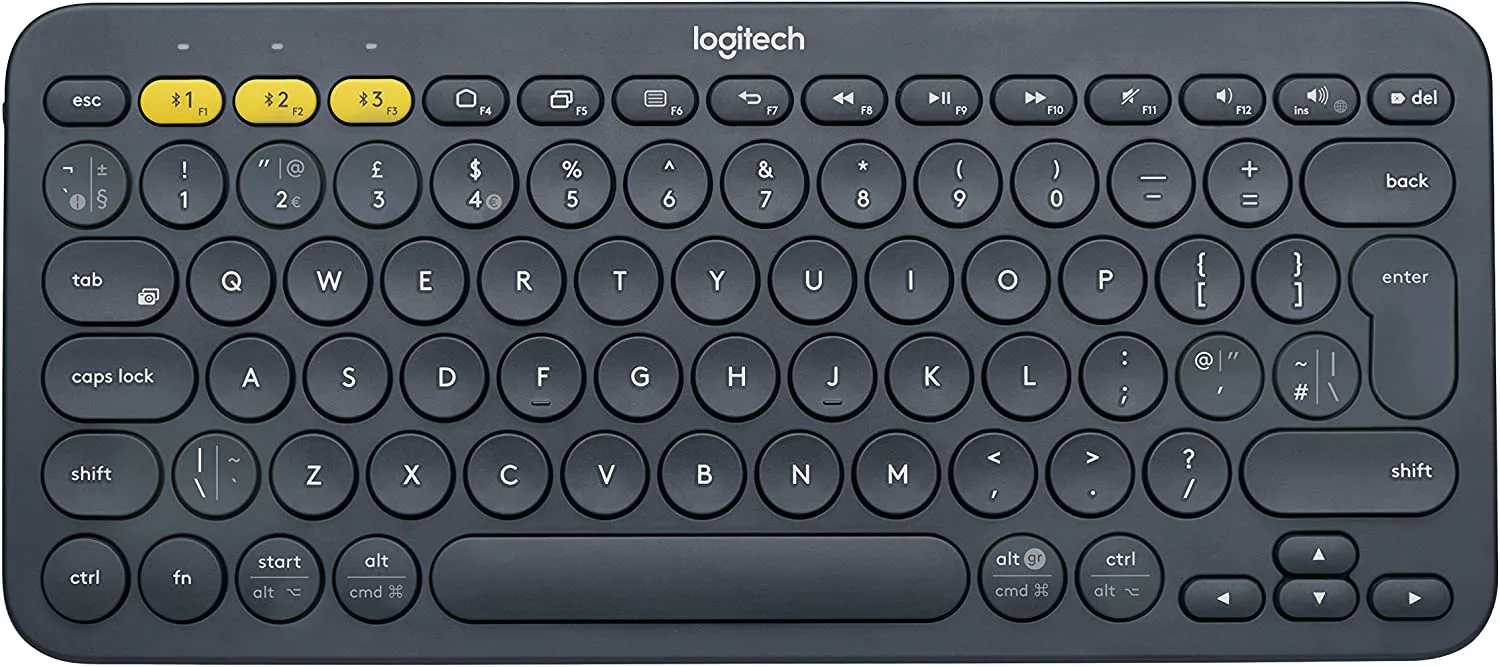
The 'special' keys along the top of the board are squished oblongs in shape - not a big deal as they aren't used so often except maybe the del key which is on that row, at the top right. The arrow keys are located at the bottom right and are also squished oblongs, arranged as you might see on some compact laptops. This is usable enough but I feel it would have been nicer if they could have fitted them in a more traditional full-sized inverted-T shape.
Typing feel is exemplary and really surprised me with how good it was. It's actually not all that different from typing on a premium-priced MX Keys keyboard (which is my daily use keyboard). Overall the feel is really pleasant and defies the low price. In my opinion, it means that the board could actually be used as a regular day-to-day keyboard and not just a portable/occasional-use keyboard. Certainly, I much prefer it to an Apple 'Magic' wireless keyboard. The keycaps have dual PC/Apple labelling so you can easily use it on Windows or Mac.
The board itself is not backlit but this keeps the price down and more importantly, the battery life up. Claimed battery life is a whopping 24 months. I obviously can't verify this having recently bought it, but many long-term reviews have said that the life is very long indeed. It runs off of 2x AAA batteries (supplied). Whilst some might say this is not as good as a built-in rechargeable battery, I feel that the long life coupled with the extreme ease of finding replacement batteries when the time comes more than makes up for it. And of course, you can get rechargeable AAAs for the best of convenience and eco-friendliness.
Logitech K380 Wireless Multi-Device Keyboard Review
This is Bluetooth only - perfectly fine as it's aimed at mobile devices and Bluetooth works very well for standard work/desktop use. Maybe not gaming though - and the small size also works against this. As mentioned earlier, you can connect to three devices and switch between them with dedicated buttons. Paring or re-pairing is really quick and easy too so you can swap it between even more devices without too much trouble.
I tried it with Steamdeck, Samsung Phone, Samsung Tablet and Surface Go. All fine - paired quickly and fully functional. On PC (and probably Mac, didn't try it) it is supported by Logitech's Options+ software allowing all kinds of remapping and full use of the special desktop and multimedia keys along the top row. This enhances its use even as a full-time keyboard, so a nice touch.
Overall, I can heartily recommend the Logitech K380 Wireless Multi-Device Keyboard. It's not going to cut it for fast FPS games or whatever, but for regular use it is fantastic. Even verging on competing with premium desktop keyboards if you don't mind the smaller size and lack of a numerical keypad. Being designed for easily switching between up to 3 devices means it is also a very solid choice if you want to use it with a tablet or a phone, in addition to a regular computer and its compactness makes it an ideal travel companion.

KEEP EXPLORING
This article was originally published on 23 Dec 2022. Product specifications, prices and availability may have changed. We sometimes receive review products and may earn commission through affiliate links. We are not obliged to publish a positive review. How we review and disclose partnerships.