
It's always satisfying when a little desk accessory does something useful without demanding a new account, a giant driver installer and half an afternoon of fiddling.
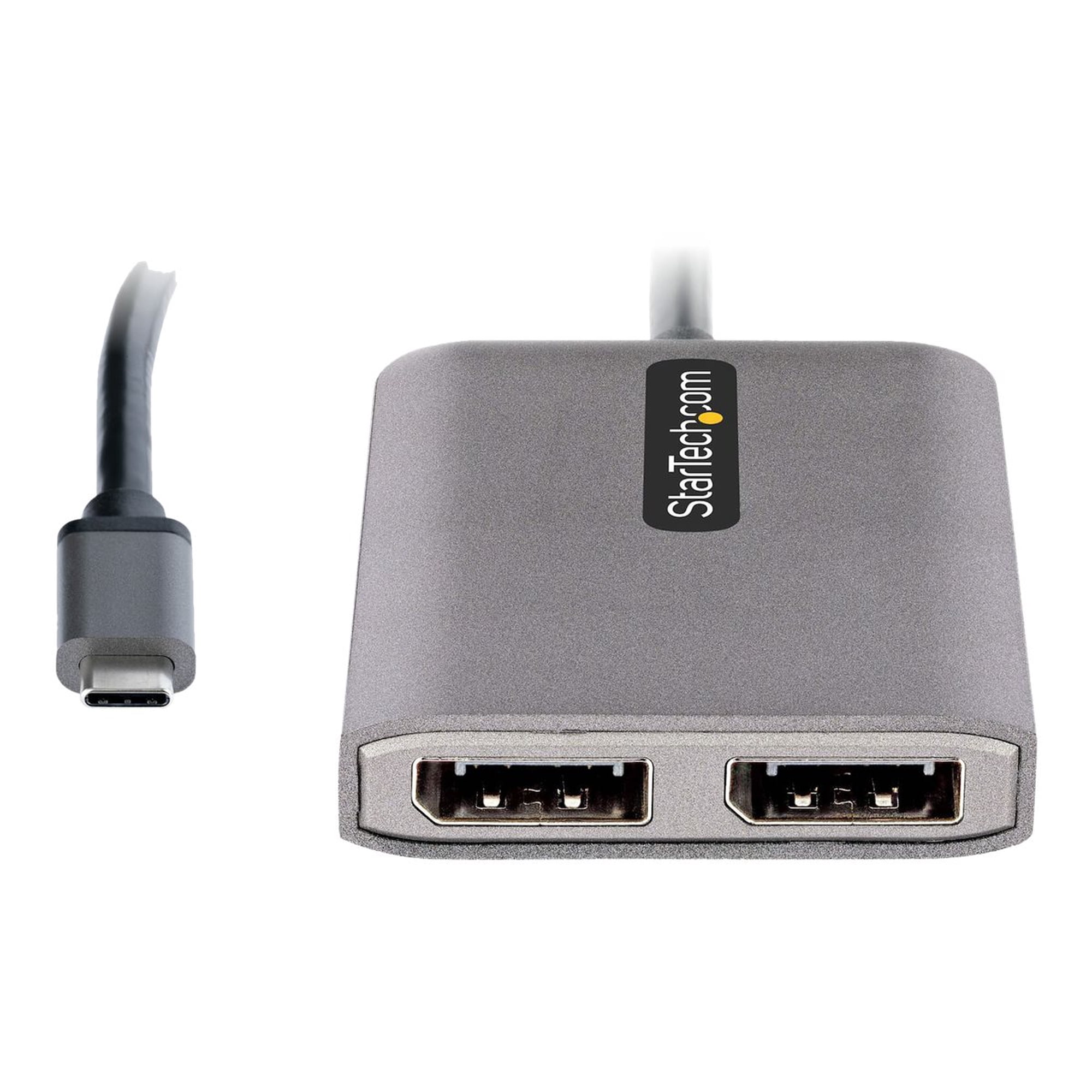
The StarTech MST14CD122DP is one of those wonderfully unglamorous gadgets: it takes a compatible USB-C video output and gives you two DisplayPort connections. It's for the person who's tired of playing monitor-port Tetris with a Windows laptop.
The original use notes behind this review are positive and refreshingly brief: easy to use, no required software, plug-and-play operation, and it worked really well with 60Hz monitors. That is enough for me to understand its main appeal. It isn't evidence of a two-5K-display lab test, though, and that distinction matters with a product covered in very big resolution numbers.
StarTech MST14CD122DP at a glance
- Connection: USB-C video input to two full-size DisplayPort outputs.
- Technology: DisplayPort 1.4 Multi-Stream Transport (MST); the host must support DisplayPort Alt Mode.
- Advertised ceiling: Up to two 5K displays at 60Hz, but only with the appropriate host, GPU and DSC capability.
- Power: Bus-powered through the host USB-C port; no extra power adapter.
- Laptop charging: No USB Power Delivery pass-through.
- Platform: Windows is the intended extended-desktop platform; not a practical two-extended-display solution for macOS.
- Our rating: 8.5/10, for the straightforward original 60Hz setup and useful connectivity, tempered by significant compatibility limits.
The best part? Plug it in and get on with work
What appealed most in the recorded setup was the lack of drama. The adapter didn't need a separate software installation and felt like a straightforward plug-and-play accessory for the 60Hz monitors being used.
A gadget that simply gets out of the way is underrated. If you've ever tried to make a slightly awkward laptop docking setup behave, you'll understand why "no extra driver" deserves to be a selling point.
StarTech's own MST14CD122DP product information supports this driver-free approach, with Windows using the graphics hardware's existing MST features. There is an optional StarTech window-layout utility for people who want help restoring app positions after unplugging; that isn't the same as needing a driver just to use the displays.
The little adapter is also bus-powered. No power brick to tuck behind the desk and no extra mains cable to add to the spaghetti collection. The built-in USB-C cable measures approximately 30cm, giving a bit more room to position it away from a crowded laptop edge.
Two 60Hz monitors are the practical story here
It's tempting to start with the dual 5K at 60Hz claim because it looks brilliant in a headline. But I think the more useful question is simpler: will it reliably support the screens on your desk?
In the supplied use notes, the adapter was great with 60Hz monitors. That's a sensible everyday scenario, particularly for documents, spreadsheets, video calls and keeping two windows visible without constantly switching tabs.
I wouldn't turn that into a claim that we confirmed two 5K panels, HDR output or gaming performance. There are no recorded monitor models, resolutions, GPU identifiers or bandwidth measurements for that original setup.
The manufacturer explains why the headline is conditional. To reach the maximum advertised dual-5K configuration, StarTech calls for a suitable Windows host supporting DisplayPort 1.4 with Display Stream Compression (DSC), a sufficiently capable graphics processor and compatible screens. Even a USB-C port that looks identical on the outside might not provide the required video signal.
If you just want two ordinary 60Hz office monitors, you're probably asking a more realistic question than someone planning to max out those 5K specifications.
Three compatibility traps worth checking before buying
1. USB-C doesn't automatically mean video output
A USB-C port might support charging and data without supporting DisplayPort Alt Mode. The adapter needs a compatible video signal from the computer, and your graphics processor must support the desired number of displays. The shape of the connector isn't proof.
Check your laptop's exact technical specification, especially if it has multiple USB-C ports with different capabilities.
2. This isn't the adapter for a two-screen Mac setup
macOS does not provide the independent extended displays this MST hub is intended to create. Apple's approach to multi-monitor output differs from Windows MST support. If you're shopping for a MacBook, I wouldn't risk buying this and hoping it works as a workaround.
StarTech labels the MST14CD122DP Windows Only for a reason. That's the kind of warning to read before paying rather than after your second screen stays blank.
3. It doesn't charge your laptop
Some docks carry video, USB devices and power through one connection. This isn't one of those complete docking stations. StarTech lists no PD pass-through, so you'll still need a separate way to charge the laptop while using the hub.
It's a fair trade-off for a compact display adapter, but only if you know it in advance.
Is the MST14CD122DP worth it?
For a Windows laptop with the right video-capable USB-C port and two DisplayPort monitors, yes, I like the simplicity. The original notes describe exactly the experience you'd hope for from a small adapter: no installation ceremony, good day-to-day use and happy 60Hz monitors.
I'd be cautious if you're chasing the very highest resolutions, because the host hardware requirements are specific. I'd skip it for a dual-extended-display Mac setup. And I'd choose a fuller USB-C dock instead if charging the laptop through the same device is essential.
It's not an exciting product in the usual sense, but there's something very satisfying about a tool that reduces your desk fuss rather than creating new problems. 8.5/10 feels right for that practical strength and the clear limitations.
If you're also deciding how to position the screens themselves, browse our productivity and desk-tech reviews for more practical setup ideas. Good monitor connectivity is only half a tidy workstation.
About this review
The original Jabba Reviews notes support easy plug-and-play installation and positive use with 60Hz monitors. StarTech supplies the technical specifications and platform restrictions. We don't present unrecorded 5K, GPU, charging or macOS configurations as results from that use.
KEEP EXPLORING
This article was originally published on 17 Nov 2026. Last updated on 17 Nov 2026. Product specifications, prices and availability may have changed. We sometimes receive review products and may earn commission through affiliate links. We are not obliged to publish a positive review. How we review and disclose partnerships.