There are plenty of flashy things you can buy for a desk setup. Yet here I am, genuinely excited about a scroll wheel. Again.
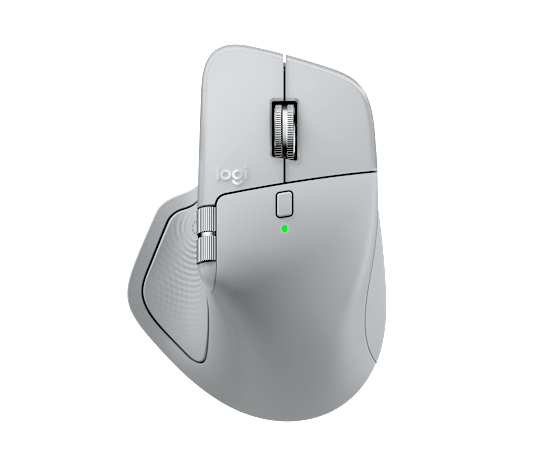
The Logitech MX Master 4 is the latest take on Logitech's much-loved productivity mouse, and it gets the important stuff right: an excellent wheel, loads of useful features and software that lets you make the controls your own. I'm a fan. It's a solid mouse that makes ordinary computer jobs feel a little less ordinary.
But I've also developed a slightly awkward habit with it: I keep pressing the button that opens the Actions Ring by accident. I didn't ask for a pop-up menu, Logitech. I was just trying to move my mouse.
So, is the MX Master 4 worth it? Mostly yes, especially if you spend a lot of time working at a computer. There's just one new feature I'd like a little more control over.
Logitech MX Master 4 at a glance
- Best for: Productivity, creative work, spreadsheets and people who love customisable controls.
- Colour reviewed: Pale Grey. Other finishes are available.
- UK price: £119.99 on Logitech's official UK store when checked in November 2026.
- My favourite feature: The MagSpeed scroll wheel. No contest.
- My biggest gripe: Accidentally triggering the Actions Ring from the thumb rest.
- Jabba score: 8.5/10.
The MagSpeed wheel is still the star
Can we talk about that scroll wheel? Because I love it.
The main MagSpeed scroll wheel can move between a controlled, line-by-line feel and a fast free-spinning mode. It's the sort of thing that sounds quite unremarkable on a product page but becomes a feature you really miss when you use something more basic.
Need to move through a long document, spreadsheet or endlessly scrolling webpage? Give it a flick. Need to stop precisely where you want? Slow things down. Logitech says the wheel can cover up to 1,000 lines a second, but that's a manufacturer figure, not something I've benchmarked with a stopwatch.
There's also a separate horizontal thumb wheel for moving sideways through wide pages, timelines and spreadsheets. It isn't the headline attraction for me, but it adds another useful control without making you hunt through menus.
Basically, the wheel understands the assignment. It's still my favourite part of the MX Master experience.
Logi Options+ makes this mouse feel like yours
I'm a big fan of Logi Options+, Logitech's free customisation software. A mouse with extra buttons is only as useful as what those buttons actually do, and Options+ gives you plenty of ways to make them earn their space.
You can reassign supported buttons, change scroll behaviour, set up different actions for different apps and adjust the haptic feedback. Logitech also offers Smart Actions for repeated tasks and Flow for working across compatible computers. Those are supported features, rather than performance claims from our own tests.
The app-specific options are particularly interesting. A thumb-wheel movement that makes sense in a spreadsheet might be better used for another command in a creative app. That's a much nicer idea than expecting everyone to use the same button layout.
For me, this is what makes the MX Master 4 appealing beyond the hardware. You don't have to use every shortcut on day one. You can keep the controls simple and get more adventurous when something starts to annoy you.
Which brings me neatly to the thing that annoys me.
The Actions Ring button is a little too easy to hit

Image: Official Logitech product gallery. This lifestyle image shows Graphite; the reviewed mouse is Pale Grey.
The new textured area under your thumb is called the Haptic Sense Panel. Pressing it opens the Actions Ring, an on-screen circle of shortcuts that can bring commands to your cursor. It can also provide little haptic taps as you use supported actions.
I understand the appeal. Putting your favourite tools where your pointer already is could be genuinely handy for the right workflow.
Here's the issue: I keep activating it without meaning to. It's positioned right where my thumb naturally ends up, so every now and then the Actions Ring makes an unexpected appearance. Once or twice would be funny. As a recurring interruption, it's not quite so charming.
I'd love an option that required a double press to open the ring, rather than a single accidental click. I haven't found an official setting that confirms a double-press trigger is supported, so I'm not going to pretend that's a fix you can switch on today.
What you can do is open Logi Options+, select the mouse and look at the Haptic Sense Panel's button assignment. Logitech documents button reassignment, so changing the panel to a less disruptive action is worth exploring. It's just a shame that such an interesting feature is also my most regular little frustration.
To be clear, I don't think the Actions Ring is a bad idea. I'd simply like it to wait until I actually invite it.
Design, connection and battery: the important details
The MX Master 4 keeps the familiar sculpted, right-handed style and adds a textured, more durable-looking surface. Logitech lists its weight at 150g, so this isn't a featherweight gaming mouse or something designed primarily for fast flick shots.
The mouse supports Bluetooth and a Logi Bolt USB-C receiver, with Easy-Switch pairing for up to three devices. Its Darkfield sensor can be configured from 200 to 8,000 DPI; Logitech says it can also track on glass, subject to its stated conditions.
Battery life is another promising specification. Logitech claims up to 70 days on a full charge, with a one-minute USB-C top-up offering up to three hours of use. Those are Logitech's advertised figures; we haven't independently run a full 70-day battery test.
The regular MX Master 4 is a versatile work mouse. Just remember that the full software experience is primarily aimed at Windows and macOS, and that the shape is specifically for right-handed users.
MX Master 4 vs MX Master 3S: should you upgrade?
If you already own an MX Master 3S, I'd think twice before upgrading purely because there's a new number on the box.
The familiar strengths are still here, particularly the excellent scrolling and deep customisation. The headline changes include the Haptic Sense Panel, Actions Ring, an extra gesture control and revised outer materials. RTINGS' independent comparison describes the updates as refinements rather than a dramatic performance leap, while TechRadar's review also praises the wheel but raises questions about some thumb controls.
Those are published third-party assessments, not claims that I've personally tested the two generations side by side. If your 3S still does everything you need, the upgrade isn't essential. If you're buying a premium work mouse for the first time, the 4 has plenty going for it.
And if competitive gaming is the priority, this isn't the obvious choice. RTINGS reports a 125Hz polling rate and notes that its weight and latency are better suited to productivity than fast-paced competitive play. That's a useful distinction for a mouse that looks premium but isn't trying to be an esports model.
Verdict: a very good mouse with one pesky quirk
The Logitech MX Master 4 gets an awful lot right. I love the MagSpeed wheel, I love how much I can personalise through Options+, and I like that its extra controls are there to make real tasks easier rather than simply inflate a spec sheet.
The Actions Ring is a clever addition in theory, but the Haptic Sense Panel sits in a spot where I keep pressing it unintentionally. Give me a double-press option and I'd be happier. Until then, I'll probably remap it.
At £119.99, this is a premium purchase, and it makes most sense for people who will actually use the scrolling, shortcuts and software. But as a day-to-day productivity mouse? It's a strong, enjoyable bit of kit, with one button that's a touch too eager to help.
Jabba score: 8.5/10.
See the Logitech MX Master 4 in Pale Grey on Logitech's official UK website for current specifications, options and availability.
Review method and sources: Our hands-on impressions cover the scrolling, software and accidental Actions Ring activation described above. We have not independently measured battery endurance, sensor latency or multi-device transfer speeds. Technical claims were checked against Logitech's product information, Logitech's setup guide, and independent reviews from RTINGS and TechRadar. Product imagery is from the Logitech gallery ; images remain copyright Logitech.
KEEP EXPLORING
This article was originally published on 14 Nov 2026. Product specifications, prices and availability may have changed. We sometimes receive review products and may earn commission through affiliate links. We are not obliged to publish a positive review. How we review and disclose partnerships.