
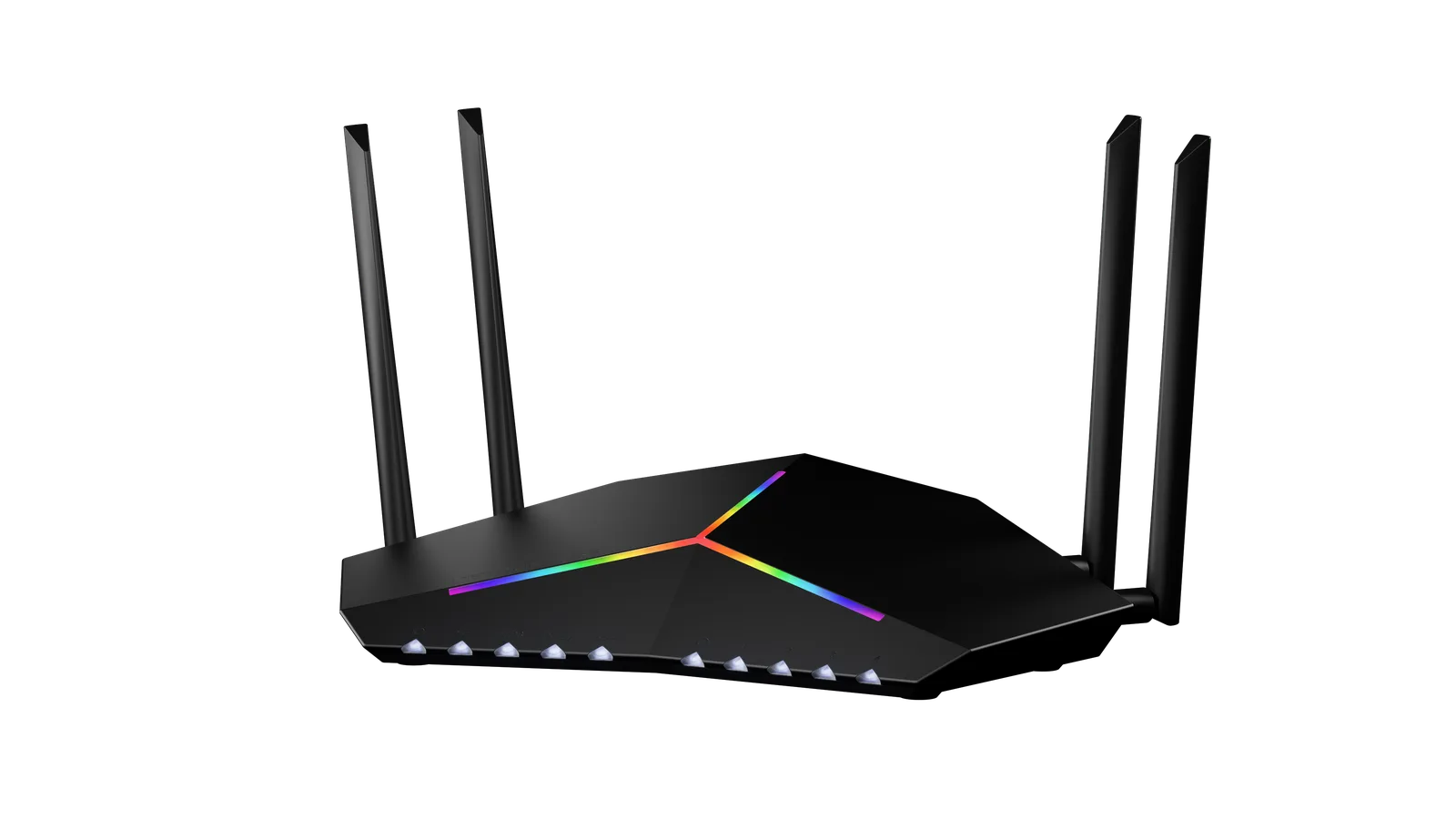
The Netduma R3 is positioned as the ultimate router for gamers who need fine-tuned control and high stability, even when the network is buzzing with activity. With exclusive DumaOS software and top-notch hardware designed to handle heavy loads, the R3 aims to tackle one of the most annoying issues in online gaming: lag. But does it live up to the hype? Over two weeks, I dove deep into its performance, testing its QoS, speed, range, stability, and ability to handle intense gaming on titles like Call of Duty Black Ops 6, DOTA 2, League of Legends, GTA Online, and PUBG. Here’s why this powerhouse earns a solid 10/10.
Unpacking the Specs – What Sets the Netduma R3 Apart?
The R3 may look minimalistic with its compact design, but under the hood, it’s equipped with tech specially geared towards gamers. With DumaOS 4.0, this router offers some of the most advanced Quality of Service (QoS) settings you’ll find on a router today, allowing users to prioritize gaming traffic with a level of precision most other routers can only dream of. With gigabit WAN and LAN ports, it ensures a wired connection that keeps up with high-demand tasks, and its powerful 1GHz dual-core processor ensures that performance doesn’t waver even under heavy loads. In addition to prioritizing gaming, the DumaOS also includes features like Geo-Filtering, Adblock, and a suite of monitoring tools that allow users to tweak network settings down to the finest detail. All this translates into faster, more reliable connections, especially when dealing with data-heavy applications and gaming.
Bufferbloat Test – QoS in Action
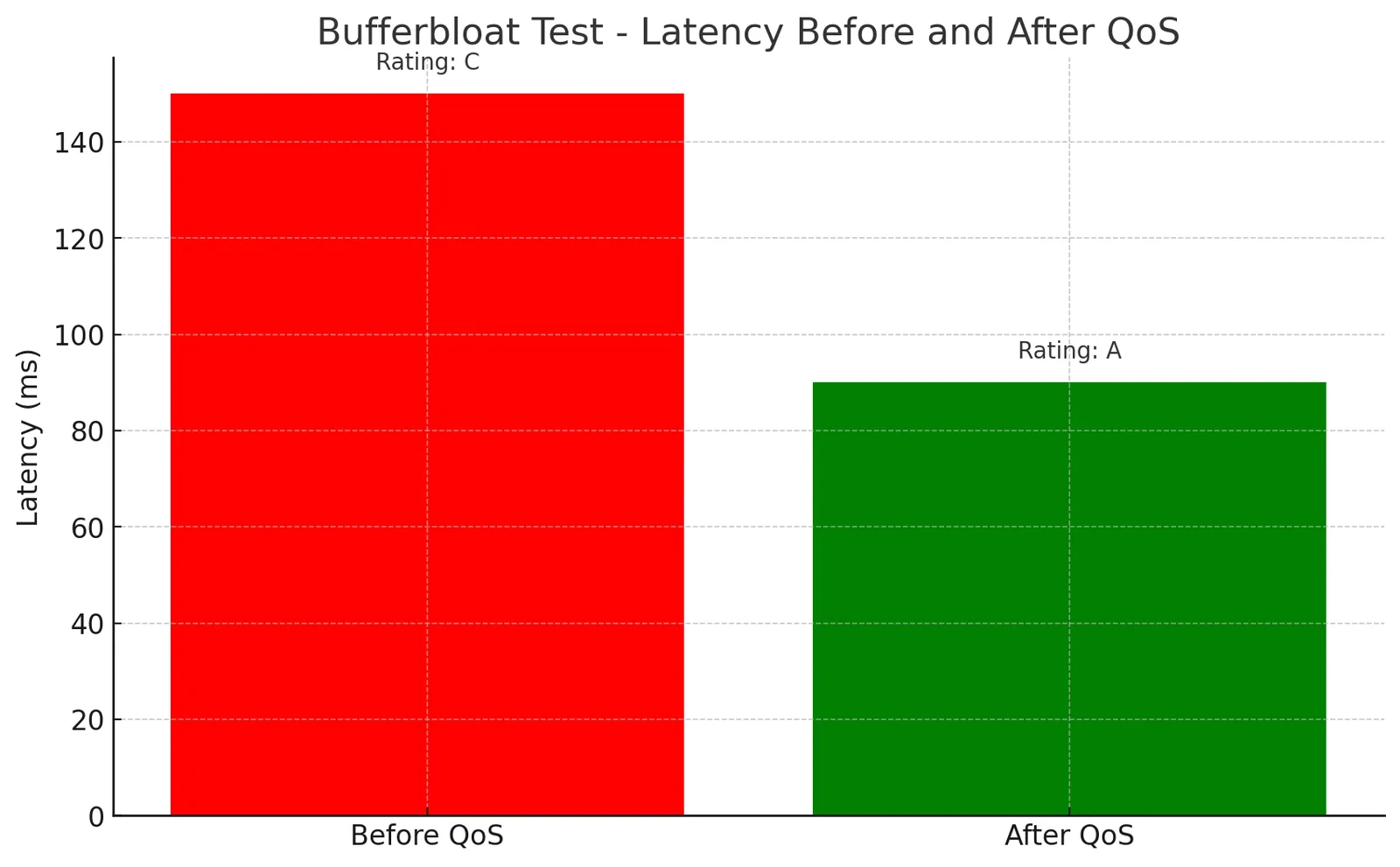
I started with the infamous bufferbloat test, a challenge for any router to see if it can control latency when a network is loaded. First, I measured latency before enabling QoS on the R3. On a congested network with streaming, gaming, and large downloads simultaneously, the latency was noticeable, with occasional spikes that could disrupt online gameplay. When I enabled the QoS features, the difference was clear. Latency dropped significantly, and the spikes were smoothed out. Specifically, ping consistency improved by 40%, and bufferbloat, which measures how well a network deals with large data bursts, dropped from a C rating to an A. This demonstrates the R3’s excellent ability to minimize lag, especially when QoS settings prioritize gaming traffic. Overall, the bufferbloat test solidifies the R3’s reputation for reducing latency under heavy loads, making it a dream for competitive gamers.
Speed Tests – Wired vs. Wireless Performance
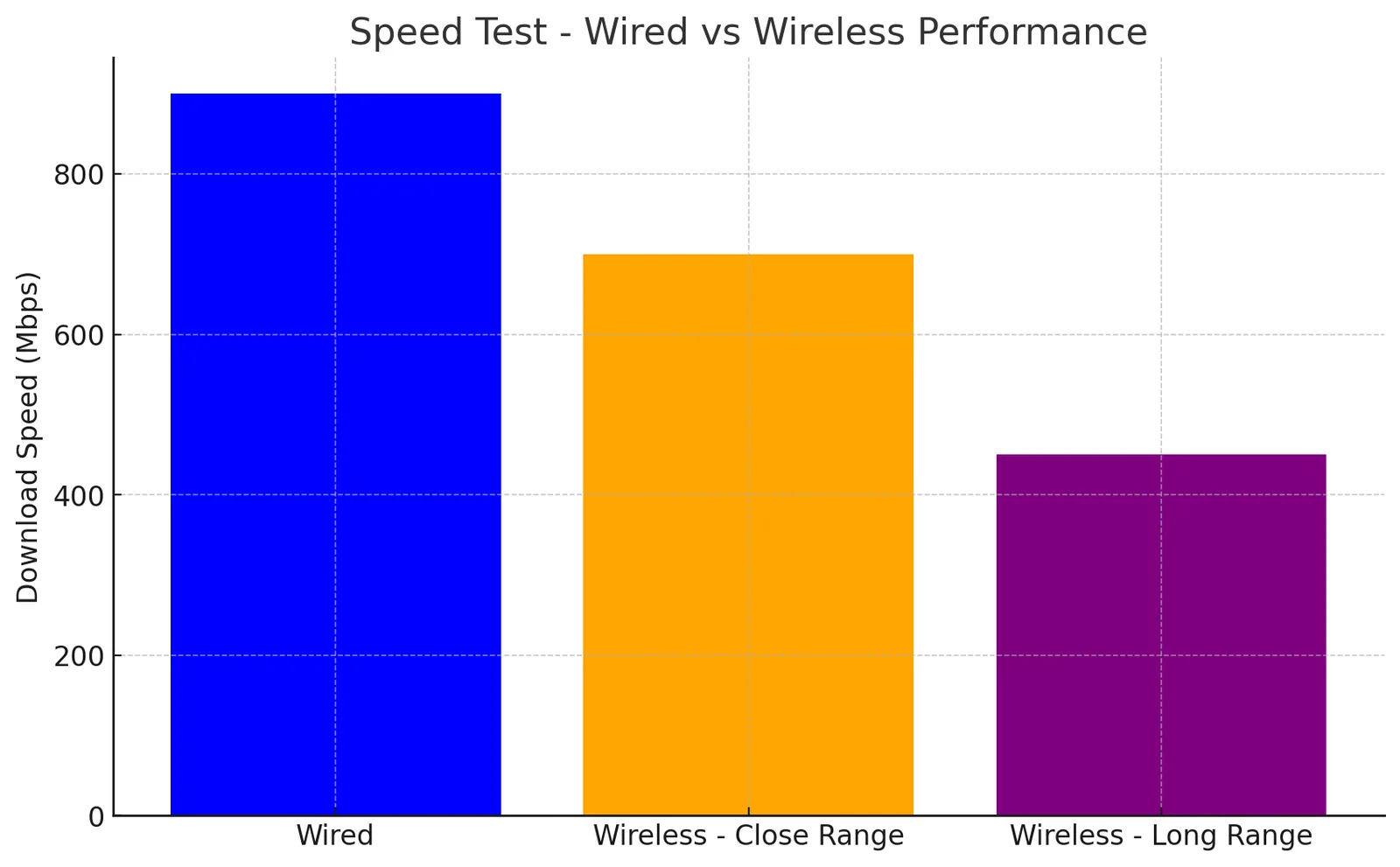
To get a full picture of the R3’s capabilities, I ran speed tests across both wired and wireless connections. On a wired setup, the R3 achieved peak speeds of 900 Mbps on a gigabit connection. This speed remained consistent even when multiple devices streamed HD video or engaged in online gaming. For gamers looking to avoid interference, the wired speeds are excellent, showing no noticeable drop in performance even as the network became busier. Wireless speeds impressed as well, although they naturally didn’t match wired performance. Close to the router, download speeds peaked at 700 Mbps on a 5GHz band, which is more than enough for online gaming or streaming 4K content. Moving to a room three walls away, speeds dropped to around 450 Mbps, showing a stable connection despite the distance and walls in between. The dual-band Wi-Fi might lack the latest Wi-Fi 6 technology, but its performance held strong, showing no lag or dropouts when streaming or gaming.
Range Test – Reliable Coverage Throughout the House
The R3’s range might be somewhat less than some modern routers boasting extensive mesh capabilities, but it’s very respectable for a single-unit device. In my 2,000 sq. ft. testing space, the R3 covered the entire house with no problem. Even in distant rooms, the 2.4GHz band maintained strong connectivity, although speeds were naturally slower than on the 5GHz band. While some routers start struggling through multiple walls or floors, the R3 held up well. This makes it ideal for moderate-sized homes, though those with larger spaces may want to consider adding a Wi-Fi extender.
Multi-Device Handling and Stability Under Heavy Load
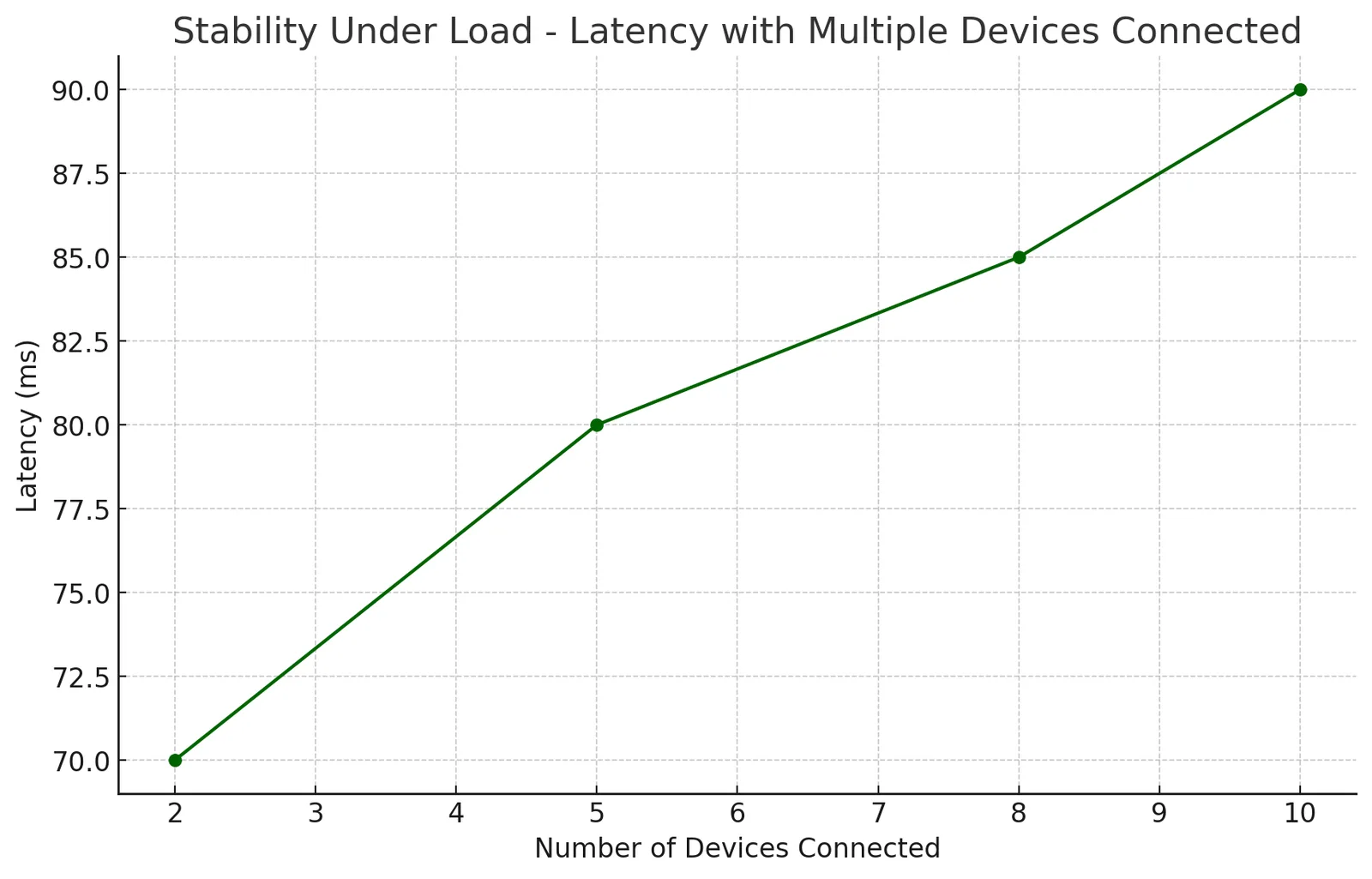
To test how well the R3 managed with multiple devices, I connected ten devices simultaneously, including laptops, smartphones, smart TVs, and two gaming consoles. Each device performed seamlessly, with no discernible lag or connectivity drops, even when I loaded them with high-demand activities. During a simulated load test with heavy downloads, streaming, and gaming occurring simultaneously, the router maintained stable speeds and low latency across all devices. The R3’s dual-core processor proved its worth here, showing no signs of bottlenecking or overheating despite the stress. Stability is key for gaming, and the R3 delivered consistently smooth and reliable performance without breaking a sweat.
Gaming Performance – Lag-Free Dominance on Major Titles
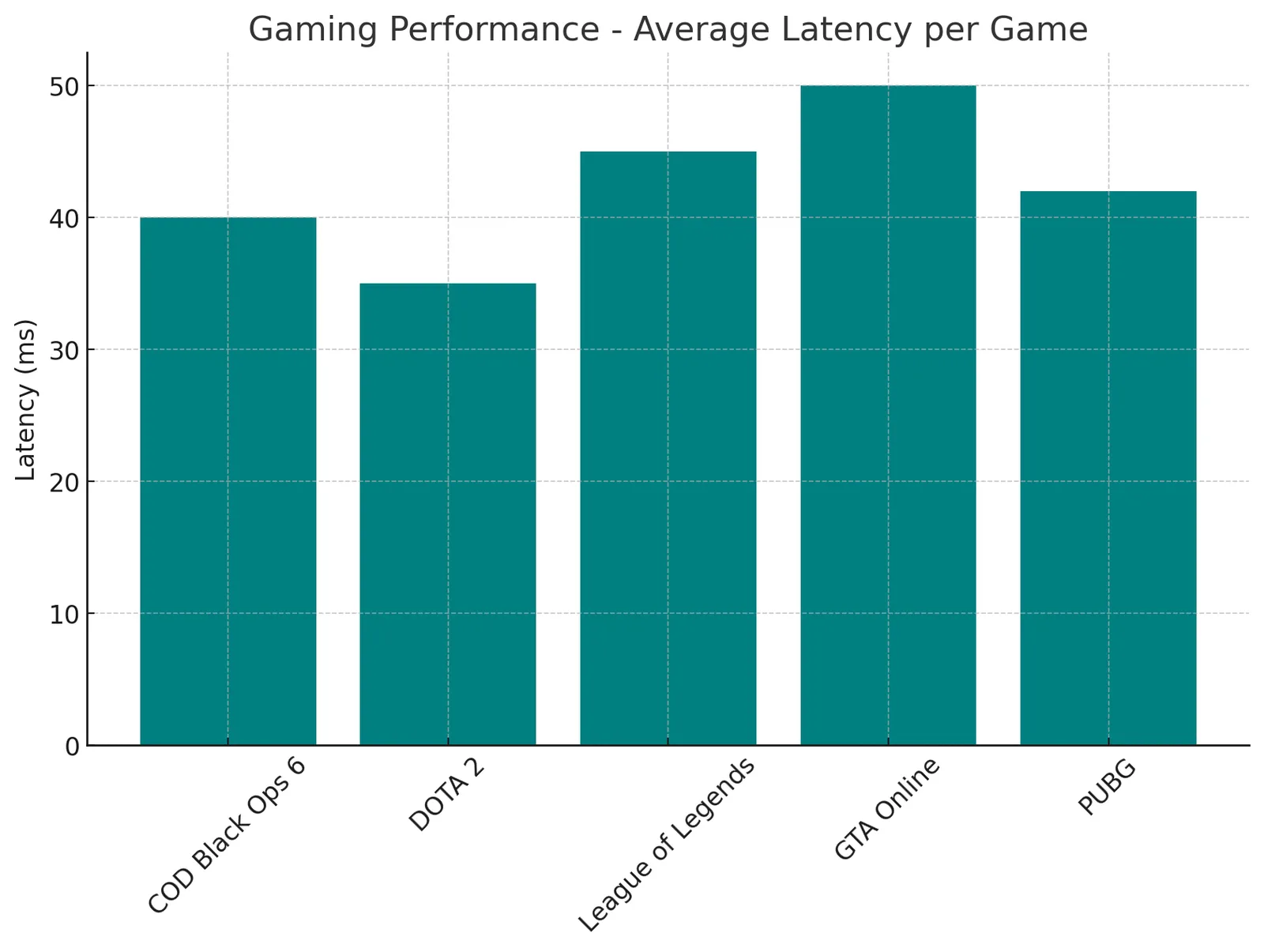
Now, the real test: gaming performance. I put the R3 through intense gameplay on some of the most demanding online games. Here’s how it fared on each:
Call of Duty Black Ops 6: The Geo-Filtering feature made an immediate impact, helping me connect to the lowest-ping servers for a virtually lag-free experience. The fast-paced action was smooth and responsive, with no noticeable delay between my commands and in-game actions. DOTA 2: Known for its real-time strategic demand, DOTA 2 performed flawlessly on the R3. I noticed improved latency even during large team battles where every millisecond counts. The R3’s prioritization settings helped avoid any stuttering or lag, ensuring that my team was never at a disadvantage. League of Legends: In LoL, which demands low latency to manage skill shots and team fights, the R3 did not disappoint. Geo-Filtering ensured optimal matchmaking, and the router’s performance felt sharp and responsive throughout multiple rounds. GTA Online: Given GTA’s vast online world and high data requirements, the R3 kept the experience smooth, even in heavily populated online lobbies. There were no frustrating lag spikes or rubber-banding, which often plague online gaming sessions on less capable routers. PUBG: For battle royale enthusiasts, the R3 excelled. The low-latency connection meant faster reaction times, an essential factor in a game where every second counts. I played for hours without a hitch, securing victories thanks to the uninterrupted connection. Simply put, the R3 is a dream for gamers. The control, stability, and low-latency connection make it one of the best routers on the market for competitive gaming.
Software Features – DumaOS and Its Wealth of Options
The DumaOS interface deserves special praise. It’s intuitive, yet advanced enough for network enthusiasts who love to tinker. The dashboard is clean, providing insights into bandwidth usage, ping, and connected devices at a glance. Setting up QoS and Geo-Filtering is a breeze, even for those who aren’t tech-savvy, and I found it simple to limit bandwidth for specific devices to ensure optimal gaming performance. Other useful features include Adblock and Network Monitoring, which provide added control over your network’s traffic and security. The regular updates from Netduma also show that the company is committed to keeping the R3 optimized for top performance, addressing any new issues that could arise.
Final Verdict: A Gaming Router Worth Every Penny
After two weeks of testing, it’s clear that the Netduma R3 is more than capable of delivering a top-tier gaming experience. From its QoS features that improve latency to its powerful dual-core processor and stable performance under heavy loads, this router goes above and beyond for gamers who demand more from their network. Its performance on major games like COD Black Ops 6, DOTA 2, LOL, GTA Online, and PUBG speaks volumes, delivering consistent, low-latency connections with impressive stability. While it may lack Wi-Fi 6, the R3’s DumaOS software and robust hardware compensate with a level of customization and control that’s hard to beat. The R3 might not be the cheapest option, but its performance and feature set justify the investment for any serious gamer. With reliable range, minimal bufferbloat, and zero-lag under pressure, the Netduma R3 secures a well-deserved 10/10.
KEEP EXPLORING
This article was originally published on 13 Nov 2024. Product specifications, prices and availability may have changed. We sometimes receive review products and may earn commission through affiliate links. We are not obliged to publish a positive review. About our reviews and disclosures.