When you think of docking stations, a few things come to mind: convenience, connectivity, and functionality. The BenQ DP1310 Docking Station promises all that and more, tailored for both work and play. But does it truly stand up to the challenge? In this review, we’ll dive into every aspect of the beCreatus DP1310, examining its performance, features, and overall value. Let’s find out if this docking station is the right fit for your tech setup.
Sleek Design and Build Quality: First Impressions Matter
The beCreatus DP1310 Docking Station immediately impresses with its sleek, modern design. Its compact form factor, coupled with a brushed metal finish, makes it a stylish addition to any desk. The build quality is solid, giving a premium feel that’s often lacking in similar products. Measuring just a few inches in width and height, it’s unobtrusive yet functional, fitting seamlessly into both home and office environments.
Connectivity Galore: Ports, Ports, and More Ports
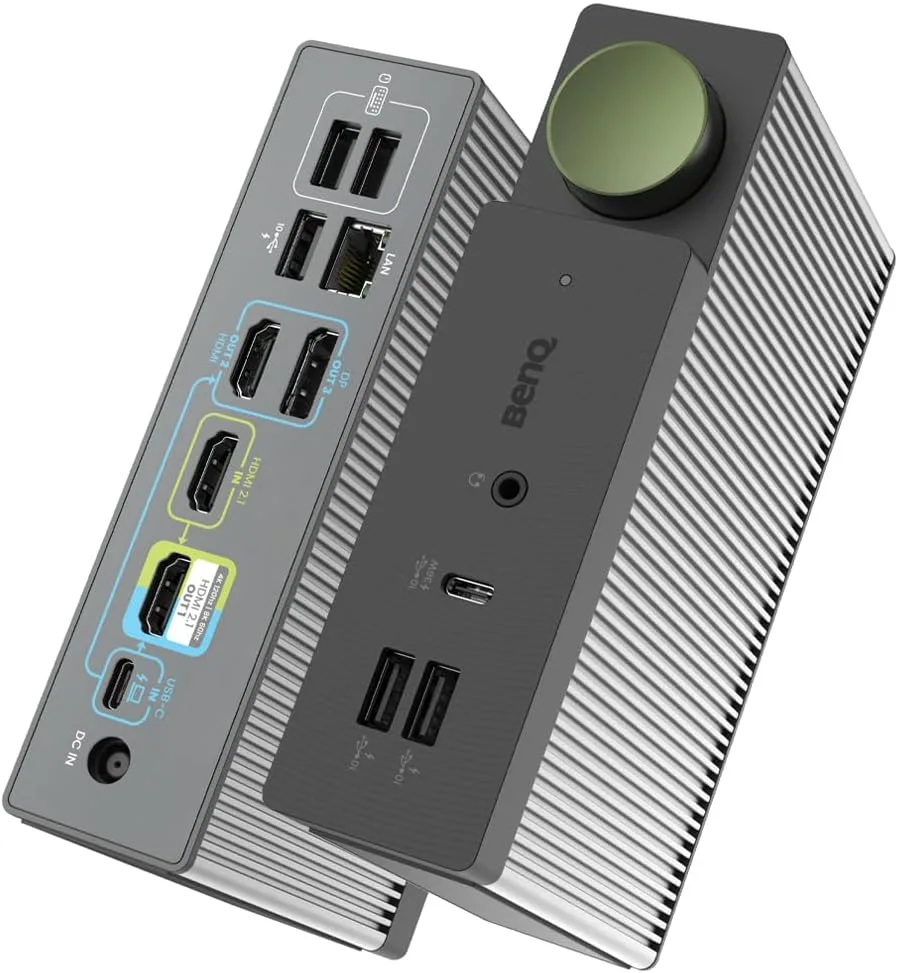
A docking station’s primary function is to expand your device’s connectivity, and the DP1310 excels in this area. It boasts an impressive array of ports, including:
- 4 USB ports (3 USB-A, 1 USB-C)
- HDMI 2.1 and DisplayPort outputs
- Ethernet port
- 3.5mm audio jack
This variety ensures that no matter what device or peripheral you need to connect, the DP1310 has you covered. Notably, this model does not include an SD card reader, contrary to some previous reports. However, the inclusion of both HDMI 2.1 and DisplayPort outputs means you can connect multiple monitors, boosting productivity and creating an efficient workspace.
Performance: Fast, Reliable, and Efficient
When it comes to performance, the DP1310 doesn’t disappoint. Data transfer speeds are quick, thanks to the 10Gbps USB ports. We tested transferring large files between a laptop and an external hard drive, and the speeds were consistently high, with no noticeable lag or delay. The Ethernet port provides stable, high-speed internet access, a crucial feature for those who require reliable online connectivity for work or gaming.
Multi-Monitor Support: A Boon for Productivity and Gaming
One of the standout features of the DP1310 is its support for multiple monitors. Using the HDMI 2.1 and DisplayPort outputs, you can easily set up a dual-monitor configuration. This is particularly useful for professionals who need extensive screen real estate for tasks like video editing, graphic design, or complex data analysis. Gamers will also appreciate the capability to output 4K at 120Hz or 8K at 60Hz through the HDMI 2.1 port, delivering a smooth and immersive experience.
Easy Setup: Plug and Play Simplicity
Setting up the DP1310 is straightforward and hassle-free. It’s a true plug-and-play device, requiring no additional drivers or software, except for the DisplayLink driver to support triple display output. Simply connect it to your laptop or desktop via the USB-C port, and you’re ready to go. This simplicity is a significant advantage, especially for users who are not tech-savvy. The included power adapter ensures that your devices stay charged, even when you’re using multiple peripherals.
Compatibility: Works with a Wide Range of Devices
Compatibility is another area where the DP1310 shines. It works seamlessly with both Windows and macOS systems, including MacBook M1 and M2 models, making it a versatile choice for users with different operating systems. During our testing, it also functioned well with various laptops, including models from Dell, HP, Lenovo, and Apple. This broad compatibility ensures that you won’t face any issues regardless of the hardware you’re using.
Audio and Connectivity Functionality: Thoughtful Touches
The inclusion of a 3.5mm audio jack is a thoughtful touch that enhances the DP1310’s versatility. The audio jack delivers clear, high-quality sound, which is ideal for video conferencing or listening to music while working. The array of fast-charging ports (up to 100W PD) is particularly beneficial for those who need to keep multiple devices powered throughout the day.
Value for Money: Is It Worth the Investment?
At its price point of approximately $299 USD, the beCreatus DP1310 offers excellent value for money. The combination of extensive connectivity options, robust performance, and sleek design make it a worthwhile investment for anyone looking to enhance their workspace. It’s particularly beneficial for professionals and gamers who rely on multiple peripherals and require a stable, efficient docking solution.
Final Verdict: A Top-Notch Gaming Dock and Macbook Dock
Overall, the BenQ DP1310 Docking Station is an outstanding choice for those seeking a reliable, high-performance hub. Its sleek design, extensive port selection, and easy setup make it a standout product in the market. While it might not be the cheapest option available, the value it offers justifies the investment. Whether you’re a professional needing multiple monitor support or a gamer looking for a performance boost, the DP1310 is a worthy contender.
Review Score: 9/10
Links:

KEEP EXPLORING
This article was originally published on 1 Jul 2024. Product specifications, prices and availability may have changed. We sometimes receive review products and may earn commission through affiliate links. We are not obliged to publish a positive review. About our reviews and disclosures.