My laptop's built-in webcam has a special talent for making a perfectly ordinary Tuesday meeting look like security footage. So a relatively affordable 4K USB webcam that promises better autofocus, a physical privacy cover and smoother 1080p video is immediately interesting.
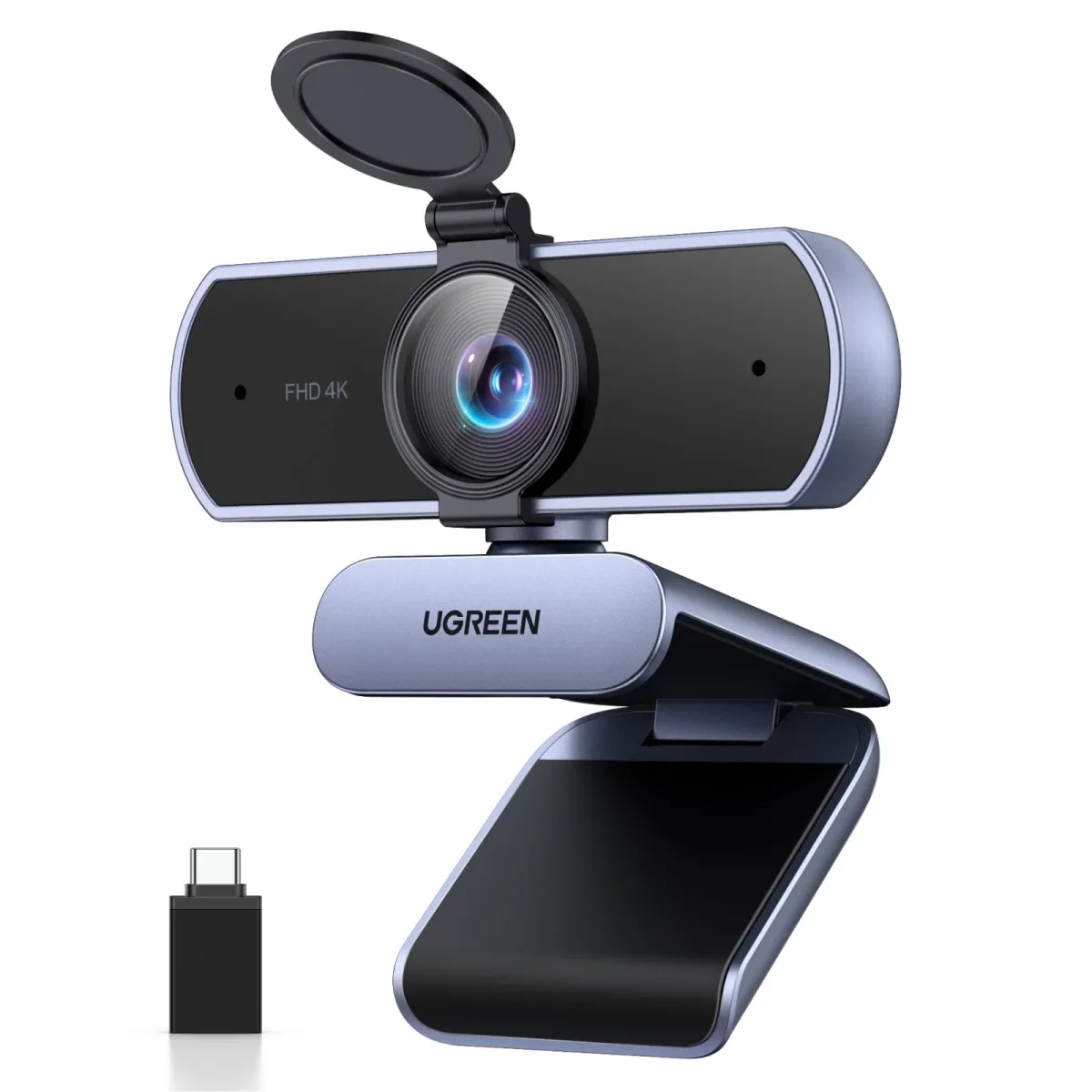
The UGREEN CM831 4K webcam (model 65381) sits in that tempting middle ground: more ambitious than the basic 1080p camera, without chasing a premium streaming setup. But does a 4K label automatically make it the best webcam for Teams, Zoom or a home office? Not quite.
Here's how I'd judge it for a UK desk setup, including the specs that really matter, the catches in the editorial research notes and the features I'd check before buying. This is an evidence-based product assessment, not a new hands-on video-quality test. We haven't measured its low-light image, microphone noise suppression or frame rate in a lab.
UGREEN CM831 webcam specifications at a glance
| Feature | UGREEN CM831 (SKU 65381) |
|---|---|
| Resolution | Up to 4K UHD at 30 frames per second |
| Alternative video mode | 1080p at up to 60fps |
| Sensor | 8MP CMOS, per UGREEN |
| Focus | Phase-detection autofocus (PDAF) |
| Field of view | About 70° diagonal |
| Audio | Two built-in microphones |
| Privacy | Physical lens cover |
| Mounting | Adjustable monitor clip and tripod-compatible mounting |
| Connection | USB-A cable with a USB-C adaptor included |
| Cable | About 2 metres, according to the model documentation |
| Compatibility | Windows and macOS; manufacturer also lists other supported systems |
These are manufacturer-published specifications for the CM831 / 65381, not benchmark results. UGREEN lists its camera on the official product page, and the CM831 specifications provide the model-specific field of view and cabling details.
4K at 30fps or 1080p at 60fps: which mode is better?
This is the biggest decision hidden in the headline. 4K at 30fps records more pixels; 1080p at 60fps trades resolution for more frames each second. Neither is automatically better for every job.
If you're filming yourself for a tutorial or recording a product close-up, higher resolution might help, provided your computer, recording application and connection support the mode. But many video-call platforms limit the resolution people actually receive. A 4K webcam cannot force a meeting app to stream 4K to everyone.
For calls where you move around, lean in or hold something up to the lens, 1080p/60fps can feel smoother if the software truly negotiates 60fps. And if your conferencing service limits the frame rate to 30fps, a more expensive-sounding camera setting may not improve what colleagues see.
I'd start with the application's camera settings, verify the captured resolution and frame rate, and leave the marketing numbers out of the decision until they translate into something visible.
Autofocus and framing: the potentially useful upgrades
UGREEN advertises phase-detection autofocus rather than a fixed-focus lens. That could be handy if you regularly show a gadget to colleagues, then move it out of shot and want the camera to return focus to your face.
But I wouldn't promise instantaneous focus without running repeatable tests. How quickly and accurately the image refocuses depends on the lighting, object distance and software processing. The editorial notes describe quick focus changes as one of the camera's potential strengths; treat that as a reason to try it, not a measured result from Jabba.
The roughly 70-degree diagonal field of view is fairly practical for one person at a desk. You shouldn't need to put the camera across the room just to fit your shoulders into shot. On the flip side, a wide view won't automatically hide the pile of boxes next to your monitor.
The privacy cover is more useful than it sounds
A physical cover is one of those features I don't think about until a meeting ends and I immediately forget whether the camera is still active.
On the CM831, the cover physically blocks the lens when closed. That's a straightforward win for peace of mind, especially if the webcam stays connected all day. The adjustable clip should suit a conventional monitor and the tripod mount gives you options if the screen is in an awkward position.
If your display has a very thin bezel, check how securely the clip rests on it. That's a possible fit issue flagged in the research notes, not evidence that every CM831 will tip or wobble.
What about the two microphones?
The CM831 has two built-in microphones, with UGREEN promoting noise-reduction features. That's convenient when you jump onto a quick call without plugging in a headset.
The important distinction is between having noise-reduction processing and performing brilliantly in a noisy room. We'd need controlled recordings to measure background-noise rejection fairly. For casual meetings, an integrated mic may be enough; for podcasts, streaming or anything you want to sound polished, I'd still look at a dedicated mic or a good headset.
That sounds boring, but it's better advice than telling you a webcam mic is studio-quality because a product listing says so.
The catches: lighting, USB setup and software
A few practical issues are worth checking before you spend your money:
- Dim-room performance. An 8MP sensor and automatic exposure do not defeat physics. A window or desk light in front of you is often a more worthwhile upgrade than chasing extra pixels in a dark room.
- Warm indoor bulbs. Automatic white balance can make colours look different under mixed lighting. If a camera looks too yellow, try consistent front lighting and your calling app's adjustments first.
- USB connections. The CM831 uses USB-A with a supplied USB-C adaptor. Check whether your PC recognises the desired video mode and avoid assuming a cheap, congested hub will always behave as well as a direct connection.
- OBS and other capture apps. If a 60fps mode isn't showing up, check the chosen format and supported resolutions in the software rather than assuming the webcam is faulty. Don't claim a 4K/60fps mode here: UGREEN specifies 4K/30fps.
- No swappable cable. A fixed lead is one less thing to misplace, but if it gets damaged you can't simply replace the detachable USB cable.
None of those are newly recorded failures of our sample. They're checks prompted by the desk-setup notes and the manufacturer's design, and should help you avoid a disappointing first video call.
UGREEN CM831 vs a cheap 1080p webcam
If you only need the odd call and you're happy with your laptop camera, there's no prize for buying another piece of desk clutter. A good basic 1080p webcam with decent lighting may be all you need.
The CM831 makes more sense when you genuinely want its combination of autofocus, physical privacy cover, flexible mounting and a choice between 4K/30 and 1080p/60. Those are tangible specifications. They won't guarantee flattering exposure or broadcast-quality sound, but they offer useful flexibility.
Prices vary across UK sellers, so verify the exact SKU 65381 rather than accidentally buying a similar UGREEN 1080p model. For an up-to-date listing and full specifications, start with UGREEN's official product information. If you're comparing desk upgrades, also see our VIVO glass-base dual-monitor stand review.
Should you buy the UGREEN CM831 4K webcam?
My take: it looks like a sensible value-focused shortlist candidate, not an automatic winner. The specs are more ambitious than those of a basic fixed-focus webcam, and I especially like seeing a privacy cover and USB-C adaptor included.
I'd be more cautious if your priority is excellent image quality in a dark room, sophisticated colour controls or professional audio. Those require performance evidence that the specifications alone don't provide. And if your calls rarely go beyond 720p or 1080p, don't buy it just for the 4K badge.
For a home office, consider the everyday questions first: will it sit securely on your screen, work in your favourite app, focus when you move and keep your face lit properly? If the answer is yes, the CM831 has a good reason to be on your list.
UGREEN CM831 FAQ
Is the UGREEN CM831 a real 4K webcam?
UGREEN advertises an 8MP sensor and 4K UHD recording at up to 30fps for the CM831 / 65381. Whether your chosen video-call app actually transmits 4K is separate.
Does the CM831 do 1080p at 60fps?
UGREEN lists 1080p at up to 60fps as an alternative supported mode. Your app, format and computer must support it.
Does it work on a USB-C laptop?
The manufacturer says a USB-A to USB-C adaptor is included. Confirm the adapter and computer setup support the camera's intended mode.
Can you use it with Zoom, Teams or OBS?
It is a standard USB webcam intended for conferencing and capture applications, but available resolutions and frame rates depend on each app's settings and limitations.
What is the difference between CM831 and 65381?
CM831 is the model designation; 65381 is the UGREEN SKU commonly used on listings for this 4K webcam. Check both when comparing retailers.
How we prepared this assessment
This article combines UGREEN's official specifications and product photographs with the existing editorial research notes. It does not claim a new hands-on test, independent sample performance numbers or a Jabba score. There isn't a verified Jabba rating in the publishing brief, so we haven't invented one.
KEEP EXPLORING
This article was originally published on 24 Nov 2026. Product specifications, prices and availability may have changed. We sometimes receive review products and may earn commission through affiliate links. We are not obliged to publish a positive review. How we review and disclose partnerships.