Smart-home packaging has a wonderful talent for making a £20 gadget sound as though it needs an IT department. Matter. Thread. Border router. You wanted a light that switches on when you get home, not a networking qualification.
The frustrating part? Those labels can be genuinely useful. It's just easy to buy the wrong combination of products when you're looking at a wall of compatibility logos.
If you're eyeing smart plugs, lights, sensors or a doorbell, here's what Matter and Thread actually mean, what hardware you might need and how to avoid paying for a setup that doesn't work as expected.
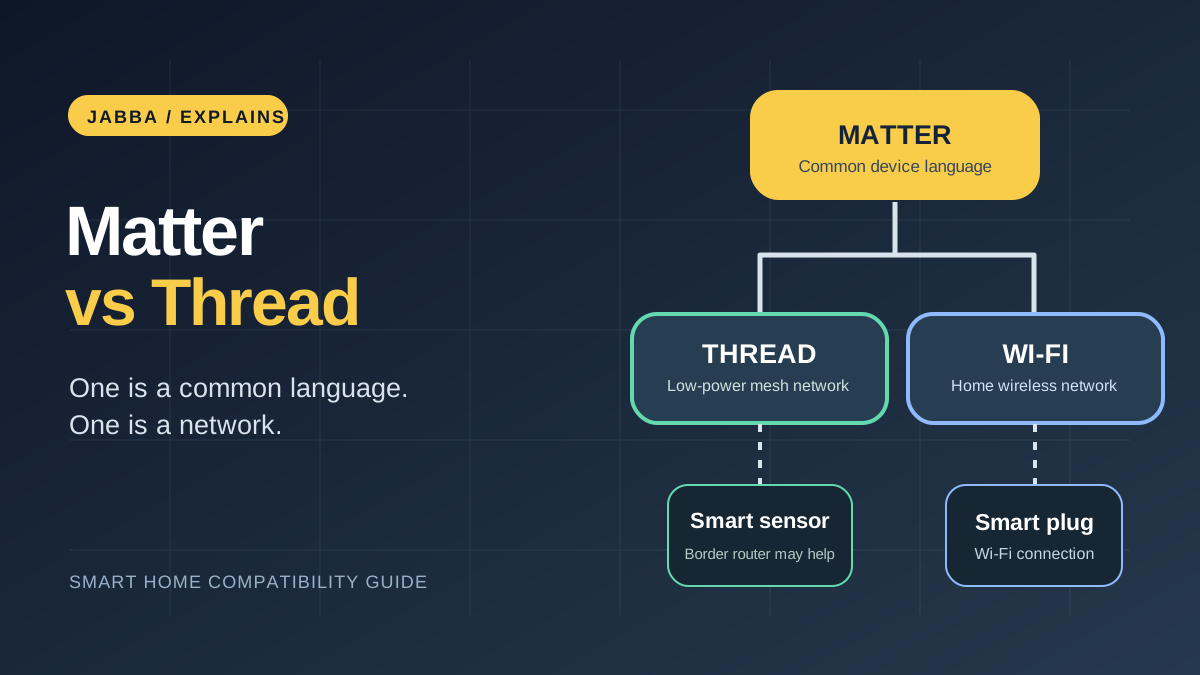
The quick version: Matter is a common language that compatible smart-home products and platforms can use. Thread is one type of network those devices can communicate over. A device can support Matter without using Thread, and a Thread device isn't automatically a Matter device.
Matter and Thread are not the same thing
Matter is a smart-home connectivity standard developed through the Connectivity Standards Alliance (CSA). Its aim is to help supported devices work across compatible smart-home platforms, rather than tying every basic function to one company's app.
Thread is a low-power wireless mesh network. It's designed for devices such as sensors, switches and some lights. Thread devices can pass network traffic around the mesh, but that doesn't remove the need for a way to connect the mesh to the rest of your home network.
Some Matter products instead use your ordinary Wi-Fi. Others use Ethernet. So when we're comparing two otherwise similar smart plugs or bulbs, two questions go straight to the top of the checklist: is the exact device Matter-certified, and does it communicate over Wi-Fi, Thread or something else? The answer tells you far more than a big 'smart home ready' badge.
The CSA's Matter 1.6 announcement describes improvements to device setup and coordination between ecosystems. It's progress, but it doesn't mean every existing platform immediately supports every new feature.
When do you need a Thread border router?
If the accessory uses Matter over Thread, you'll typically need a Thread border router to connect it to your home's other devices and network services.
This isn't the same as buying any old Wi-Fi router. Some smart-home speakers, displays and streaming devices have a border router built in, while others only act as a Matter controller for Wi-Fi accessories.
For example, Google's UK compatibility guide distinguishes hubs supporting Matter over Wi-Fi from devices that also have Thread border-router capability. Nest Hub (2nd generation), Nest Hub Max, Nest Wifi Pro and Google TV Streamer (4K) are among Google's documented Thread-capable options.
Apple also documents which HomePod and Apple TV models can serve as Thread-enabled hubs. Its UK setup guidance explains that some compatible iPhones can pair with Thread accessories locally, but remote access, automation and a consistently available network may still require suitable home-hub hardware.
Our take: We'd check the model number of the hub on the shelf before choosing any Thread accessory. That five-minute check is much less irritating than unpacking a bulb only to discover the wrong generation of smart speaker is sitting next to it. Don't rely on the product-family name alone.
Does Matter mean Apple Home, Google Home and Alexa all work?
It can make switching or sharing devices between supported platforms easier, but the platform needs to support the device category and functions you want.
A Matter-certified smart light might offer its basic on/off and dimming controls across different apps, yet still keep a specialist scene or unusual effect inside the manufacturer's app. The same issue can apply to sensor capabilities and advanced device settings.
Google explicitly notes that platforms roll out support for different Matter device types at different times. Apple provides a separate list of Matter accessory types supported by Home.
So check the actual words on the product listing. "Works with Alexa", "Matter-compatible" and "uses Thread" are different claims. Don't treat one as proof of the other two.
That also matters if you're buying a camera. The Matter standard gained camera and video-doorbell capabilities in version 1.5, and the CSA refined these in Matter 1.5.1. But a standards update doesn't automatically upgrade an older camera or guarantee your chosen app supports those features.
A useful reality check from another reviewer: TechRadar's hands-on Nanoleaf Matter Essentials review reported that connecting a bulb to Google Home through an iPhone was initially troublesome, but firmware updates later improved pairing. That isn't a problem we retested ourselves; it is a good reminder that compatibility on a box and a smooth first setup are different things. When two products seem equally capable, we'd favour the maker with clear update instructions and active support.
What happens to the manufacturer's app?
You may still want it. Initial setup, firmware updates, detailed battery information or special lighting scenes can rely on the brand's own software, even when the basic controls work through Matter.
That's not necessarily a problem. It just means Matter isn't a promise of identical features in every app.
Here's where our earlier reviews add some useful colour. In our original Nanoleaf Matter smart bulbs review, the writer described pairing B22 bulbs with a HomePod mini, Nest Hub and Amazon Echo, and particularly liked being able to adjust the light for reading, film nights and voice commands. Those are specific observations from that 2023 setup, not proof that every 2026 bulb, feature or hub combination behaves identically. It's exactly why we like checking the practical features, not just the logo on the packaging.
If all you want is a lamp that comes on in the evening, we'd start by asking whether a smart plug does the job. The Tapo Mini Wi-Fi socket article covers app schedules, voice control and energy-monitoring features on a particular older model. You don't need to chase a cutting-edge standard for every socket in the house. You do need to check the exact Tapo model if Matter support is part of the buying decision.
Five things to check before paying
- Your preferred app: Is the exact accessory category supported by Apple Home, Google Home, Alexa or whichever system you use?
- The connection method: Does the packaging say Matter over Wi-Fi, Matter over Thread or just Thread?
- Your existing hub: If the device needs Thread, does one of your current devices actually contain a Thread border router?
- The features that matter to you: Will schedules, scenes, camera feeds, energy readings or sensors work in your chosen app, or only in the manufacturer's?
- Updates and support: Does the maker explain firmware updates, account requirements and what happens if your internet connection drops?
Keep the pairing code or QR card somewhere safe, too. If you share a device across ecosystems, Apple's instructions describe how to generate a fresh pairing code from the app where it's already configured. It isn't always a case of scanning the same printed code over and over.
Is Matter worth prioritising in 2026?
For a house that gradually accumulates a smart bulb here and a socket there, we'd put Matter support fairly high on the shopping list. It can make switching between compatible platforms less painful. Thread is attractive for suitable low-power accessories, but we'd only pay extra for a Thread-specific feature if the rest of the setup can actually use it.
But I'd put the practical checks first: Will it work with my actual hub? Can I use the feature I'm buying it for? What happens if I change phones or smart-home platforms?
A compatible setup that's simple to live with beats a cupboard full of impressive logos every time.
How we put this together: We compared current compatibility guidance from the CSA, Google and Apple with relevant observations recorded in Jabba Reviews' earlier product articles. We have not retested current smart-home combinations for this guide; platform support can change with software updates.
KEEP EXPLORING
This article was originally published on 17 Nov 2026. Product specifications, prices and availability may have changed. We sometimes receive review products and may earn commission through affiliate links. We are not obliged to publish a positive review. How we review and disclose partnerships.