Finding the right keyboard for Mac can often feel like a Goldilocks story. The Apple Magic Keyboard is sleek, but its minimalistic design may leave your fingers craving a more robust typing experience. Enter the Logitech MX Keys S for Mac—Logitech’s attempt to bring a premium alternative to Apple’s beloved accessory lineup.
Design & Build Quality: Solid Enough to Double as a Paperweight
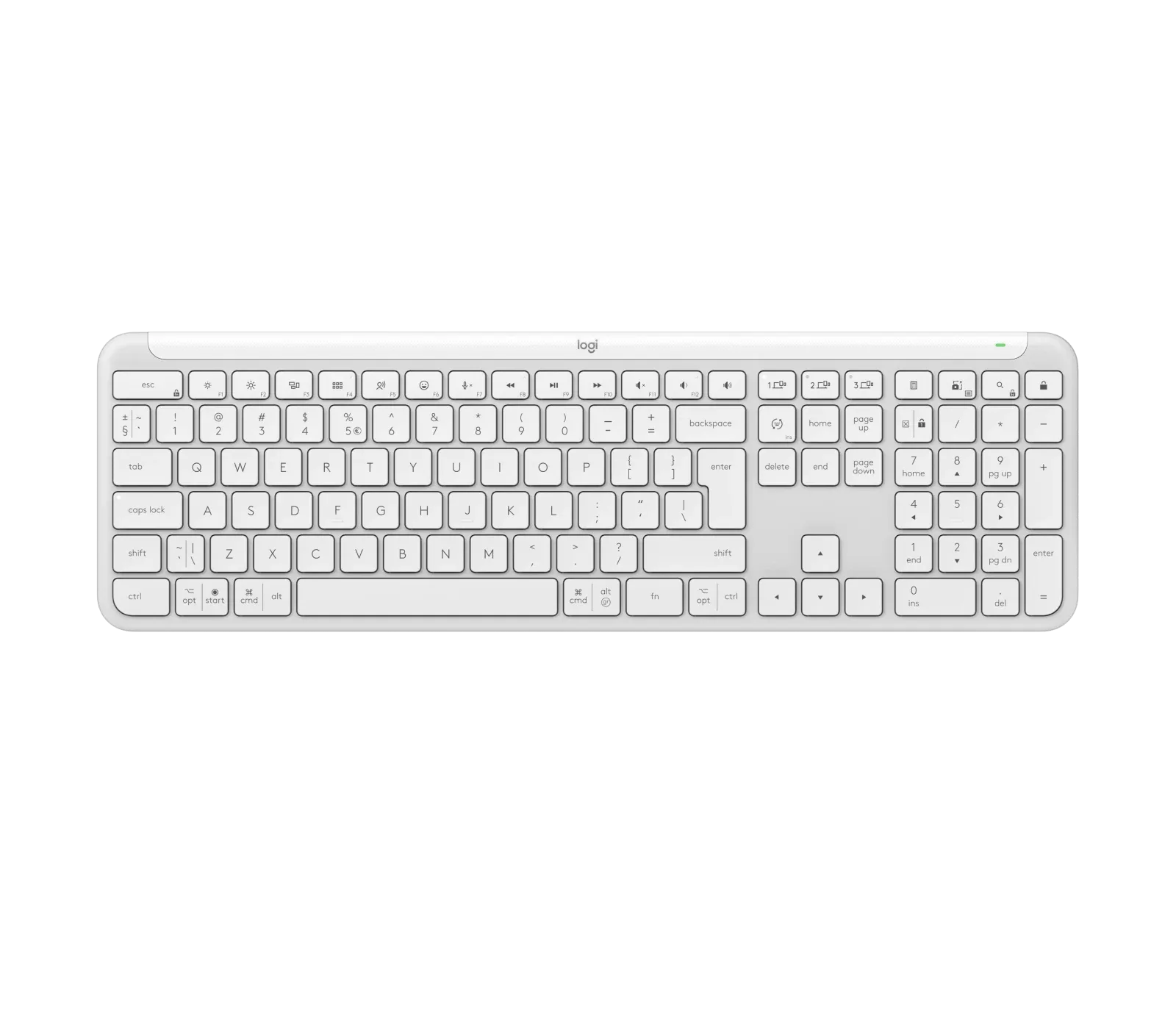
One of the first things you'll notice when unboxing the MX Keys S for Mac is its substantial build. Compared to Apple’s Magic Keyboard, the Logitech offering feels heavier, giving a reassuringly solid presence on your desk. While weight isn’t always a direct indicator of quality, here, it lends the MX Keys S an air of durability. It's not sliding around your desk, nor does it feel like it could break from a particularly enthusiastic email session.
The keyboard has a low-profile design, making it comfortable to use even without a wrist rest. If you’re a fan of the smooth, slim look of the Magic Keyboard but want something with a bit more heft and key travel, this is an excellent middle ground.
Typing Experience: Comfort with a Touch of Class
The typing experience on the MX Keys S for Mac strikes a fine balance. The scissor switches are tactile without being too clicky, offering a satisfying “thunk” with each press. If you’ve used Logitech keyboards before, you’ll be pleased to know that this iteration improves upon past models, providing a great typing feel without the aggressive loudness of mechanical keys.
The keycaps themselves are slightly dished, helping guide your fingers to the center of each key and reducing typing errors. The inclusion of adjustable backlighting is a nice touch, with the lighting automatically adjusting based on the surrounding environment. This means you can comfortably type late into the night without squinting at dim keys, and the light will fade when you’re away, conserving battery life.
Connectivity & Features: The Swiss Army Knife of Keyboards
One of the major selling points of the MX Keys S for Mac is its ability to connect to multiple devices. You can easily switch between up to three paired devices, making this a dream for those juggling a Mac, an iPad, and perhaps even a PC. This makes it an ideal companion for multitaskers.
The keyboard pairs via Bluetooth and, unlike the Windows-focused MX Keys S, it does not come with a Logi BOLT receiver. However, it’s optimized for Apple devices, with Mac-specific key layouts and seamless compatibility. Additionally, Logitech’s Flow technology allows you to copy and paste text, images, and files between devices, including between Mac and Windows machines. While Apple users might already be familiar with Universal Clipboard, this feature extends your workflow across different platforms.
Software Customization: Make It Yours with Logi Options+
The Logi Options+ app elevates the functionality of the MX Keys S for Mac. It enables deep customization, including remapping keys, creating macros (or Smart Actions, as Logitech calls them), and adjusting backlighting settings. This level of customization allows users to tailor the keyboard to their specific workflow, whether that involves launching certain apps or managing lighting to save battery.
The app also features preset Smart Actions to automate common tasks, such as launching your work apps in the morning or preparing for a video call with one keystroke. These time-saving features are perfect for users looking to optimize their daily routines.
Battery Life: Good, But Not Magic
When it comes to battery life, the MX Keys S for Mac offers up to 10 days on a full charge with backlighting on, and up to five months with the backlighting turned off. While this is respectable, it’s not revolutionary. Heavy users of the backlighting feature might find themselves reaching for the USB-C charging cable more often than they’d like. However, for light typists or those willing to sacrifice illumination for battery longevity, the keyboard offers a solid balance between form and function.
Verdict: Is It Worth the Price?
At £109.99, the Logitech MX Keys S for Mac is not a budget option, but it is priced competitively against Apple’s Magic Keyboard, which lacks some of the features that make the MX Keys S shine—most notably, backlighting and multi-device support. The build quality, typing experience, and added functionality through the Logi Options+ software make this a premium choice for Mac users who want more than what Apple's stock offering provides.
The lack of Touch ID may be a dealbreaker for some, but for users who prioritize versatility, comfort, and customizability, the MX Keys S for Mac is a fantastic choice.
Score: 8.5/10
KEEP EXPLORING
This article was originally published on 3 Sept 2024. Product specifications, prices and availability may have changed. We sometimes receive review products and may earn commission through affiliate links. We are not obliged to publish a positive review. About our reviews and disclosures.